




Google now allows you to select your preferred news sources – making it easier to see more content from the publishers you trust most.
If you regularly turn to Women’s Weekly Food for our tested recipes, baking inspiration, weeknight dinners and special-occasion favourites, you can now let Google know you’d like to see more of our content when they’re relevant to your searches.
It takes less than a minute.
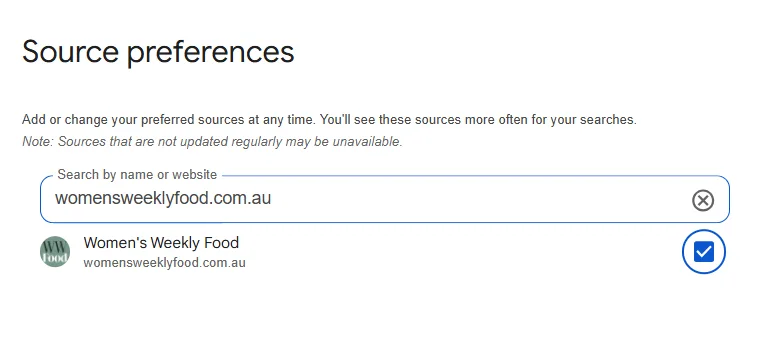
How to add Women’s Weekly Food as a preferred source
- Visit Google’s Source Preferences page
- Search for womensweeklyfood.com.au
- Select Women’s Weekly Food
- Save your selection
You can add Women’s Weekly Food as your preferred source here.
Why set preferred sources?
When you choose your preferred publishers, Google is more likely to show their content in your search results – particularly in Top Stories.
By selecting Women’s Weekly Food, you’ll see more of our:
- Tested recipes from Australia’s most trusted Test Kitchen
- Baking classics and school lunch box favourites
- Seasonal entertaining ideas
- Quick weeknight meal inspiration
- Product reviews
You can update your preferred sources at any time.
Related stories

Native ad body.
Sponsored by %%sponsor_name%%

Native ad body.
Sponsored by %%sponsor_name%%



Native ad body.
Sponsored by %%sponsor_name%%

Our ultimate Easter dinner party guide
Brought to you by Ziploc


Native ad body.
Sponsored by %%sponsor_name%%
